MCP for expense reports: ask Claude about your T&E spend without exposing an employee
The short answer
Yes, a finance team can ask Claude "what was our hotel spend by country over the last twelve months, and where are the anomalies concentrated?" and get a chart in seconds. The protocol that makes this possible is called MCP.
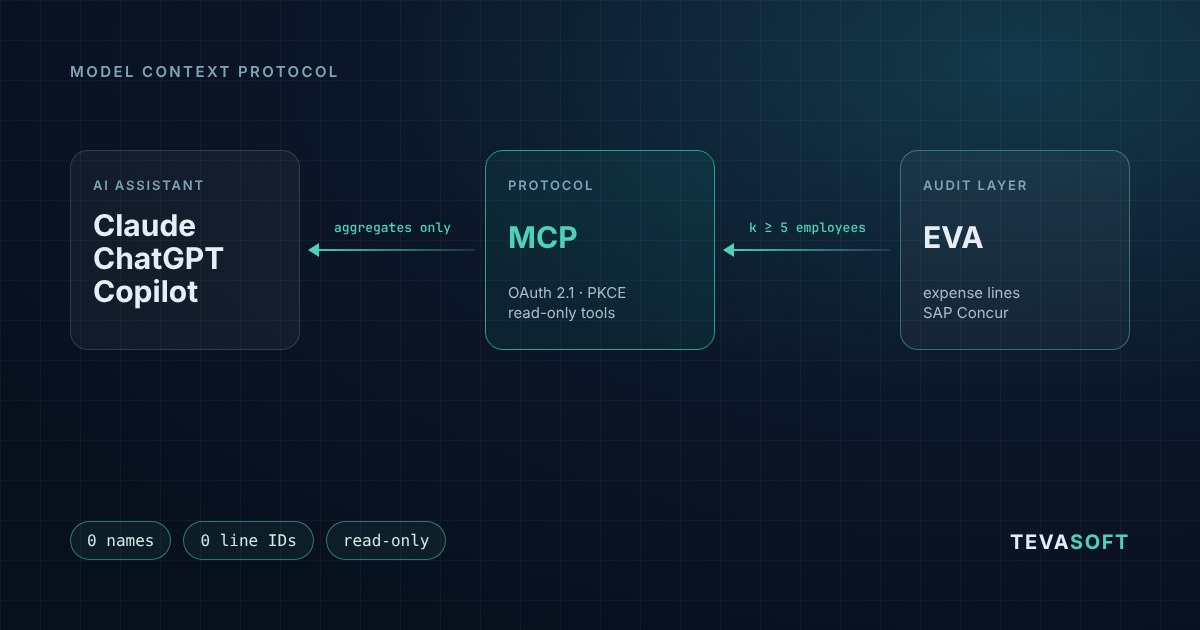
But plugging an AI assistant into expense reports is nothing like plugging it into a product catalog. This data describes people: where they travel, what they eat, who they dine with. So we built EVA's MCP server around one rule: the assistant only receives aggregates, never a line, a report or a name.
MCP in two sentences
The Model Context Protocol is an open standard, published by Anthropic in November 2024, that lets an AI assistant call tools exposed by third-party software [1]. It is supported by Claude, ChatGPT, Gemini, Microsoft Copilot and Visual Studio Code, and in December 2025 its governance moved to the Agentic AI Foundation, under the Linux Foundation [2].
In practice, the software vendor describes tools ("spend by category", "anomaly rate by control"); the assistant picks the ones that answer the question, calls them and formats the result.
Why expense reports are a special case
An expense line is a name, a date, a city, a restaurant, sometimes the names of the guests. Put together, those lines describe an employee's schedule. Sending that detail to an AI provider just to draw a monthly spend curve would be disproportionate, and hard to justify under the GDPR's data minimisation principle.
So the question isn't "can we connect AI to our expense reports?" but "what exactly leaves the system, and who authorised it?".
What the assistant receives, and what it never receives
EVA's MCP server exposes six tools, all read-only:
- Overview: period covered, number of employees analysed, expense lines and lines already checked.
- Spend by month, by category and by country: amounts in euros, number of lines, rate of flagged lines.
- Two-dimension breakdown: for example category × country, cell by cell.
- Anomaly rate by control: duplicates, amount mismatch, provisional document, photo of a screen, AI-generated receipt…
Every response is built from an allow-list of fields. A field that isn't on the list never leaves, even if it exists in the database. No response contains a name, an email, a SAP Concur ID, a report or line number, a supplier name, receipt text, an anomaly message or a ranking of employees.
Every response also states its scope: which date field was used, the period bounds, the currency, and the fact that deleted lines and excluded employees were left out. Any figure the assistant gives must be traceable to a screen in EVA.
| Question asked to the assistant | Never sent | What the assistant receives |
|---|---|---|
| Hotel spend by country over 12 months | Hotel name, employee, date of each night | Total, line count and anomaly rate by country |
| Where are duplicates concentrated? | The duplicate lines and who submitted them | The failure rate of the duplicate check |
| Spend trend since January | The content of any report | One value per month |
The 5-employee threshold, in practice
An aggregate can still give a person away. "Taxi spend in Portugal: €1,840" protects nobody if only one employee went to Portugal. So EVA applies a minimum group size:
- A group of fewer than 5 distinct employees is never published on its own. It is merged into an "Others (groups < K)" line.
- The threshold counts employees, not lines: forty reports from the same person are still a group of one.
- The customer can raise the threshold, never lower it below 5.
Breakdowns need one more safeguard. If a category total is known and every cell in its row but one is visible, the hidden cell can be recovered by subtraction. EVA then hides additional cells (secondary suppression) until no subtraction can rebuild a small group. The tool descriptions also tell the assistant never to estimate or reconstruct a hidden cell.
On our demo environment (fictitious data, 135 employees, 12 months), five controls that each ran for fewer than 5 employees are merged into a single "Others" line covering 9 employees. The assistant knows those controls exist, not who they concern.
Who decides to connect the assistant
- The customer, at two levels. The feature is off by default. An administrator turns it on in EVA (Config > AI assistants), then each authorised user connects their own assistant.
- OAuth 2.1 with PKCE. Users sign in with their EVA account and read a consent screen stating what will be shared. No password is ever given to the assistant.
- Permissions re-checked on every call. A user who loses the right to view analytics loses access immediately, without waiting for the token, valid for one hour, to expire. Connections can be revoked at any time.
- One endpoint per customer. The server runs on each customer's own EVA domain: isolation between customers doesn't depend on any parameter the assistant could change.
- Everything is logged, except responses. Each call is recorded (user, tool, period, merged groups, duration). Response content is not.
- A load limit. 30 calls per hour per user: an assistant stuck in a loop won't slow down your controllers.
The 5-employee threshold is a technical safeguard. On its own, it does not make the aggregates anonymous data under the GDPR. Document the use in your record of processing activities with your DPO, and read the terms of the AI provider you connect: that is where the aggregates go.
What it changes for a finance team
Until now, the same question meant an export, a pivot table and half a day of rework. With the MCP server, it is asked in plain language:
- "Show me spend by category over 12 months and the categories with the highest anomaly rate."
- "Compare hotel spend by country between the first and second half of the year."
- "Which controls have fired most often since September?"
The assistant chains the tools (overview, spend by category, anomaly rates), draws the chart and carries the "Others" line and the stated scope into the legend.
What the MCP server does not replace: reviewing a line, deciding to approve or send back a report, looking into an individual case. All of that stays in EVA, with the controller. And extracting line-level detail or receipts is the job of Smart Extract, not of the assistant.
The limits, stated upfront
- No individual detail, by design. To look at a case, open EVA.
- Calendar months as the unit, over 36 months at most.
- No department, manager or supplier dimension for now: too easy to re-identify.
- French works council (CSE) tenants aren't covered yet.
- Computed inside EVA. Amounts are encrypted at rest and summed inside EVA, never by the assistant: a first question over a long period can take a few seconds, and results are then cached for 10 minutes.
How to try it
EVA's MCP server is in early access for EVA customers (Expense Control or Audit Snapshot). We use it with Claude; since the protocol is a standard, other MCP-compatible assistants can connect depending on their support for OAuth connectors. We demo it on an environment with fictitious data.
Contact us for a demo, or discover EVA and the Audit Snapshot. On the same topic: what we learned by plugging an AI agent into a real expense report flow.
Sources
[1] Anthropic, Introducing the Model Context Protocol, November 2024
[2] Anthropic, Donating the Model Context Protocol and establishing the Agentic AI Foundation, December 2025