How to spot AI-generated fake receipts in expense reports
Short answer: an AI-generated fake receipt rarely gives itself away to the eye. The reliable signals are in the data: arithmetic that doesn't add up (line items, tax, total), a merchant that can't be verified, a date and time that don't match the venue's opening hours, unusual image metadata, and no matching card transaction. The strongest defense combines automated review of 100% of receipts with fewer expenses whose proof goes through the employee (corporate cards, e-invoices sent by the supplier).
Why AI-generated receipts change the game
In March 2025, TechCrunch showed that ChatGPT could generate a perfectly realistic restaurant receipt in minutes: stains, paper creases, the typeface of a till receipt [1]. The tools have only improved since. The barrier to entry for expense fraud is now close to zero: a convincing restaurant, hotel or taxi receipt takes seconds to make, for free, with no technical skill.
According to AppZen, quoted by the Financial Times, 14% of fraudulent documents submitted in September 2025 were AI-generated, a phenomenon that did not exist twelve months earlier [2]. And in a SAP Concur survey published in early 2026, 32% of finance professionals admitted they would not be able to recognize an AI-generated receipt during a manual review [3].
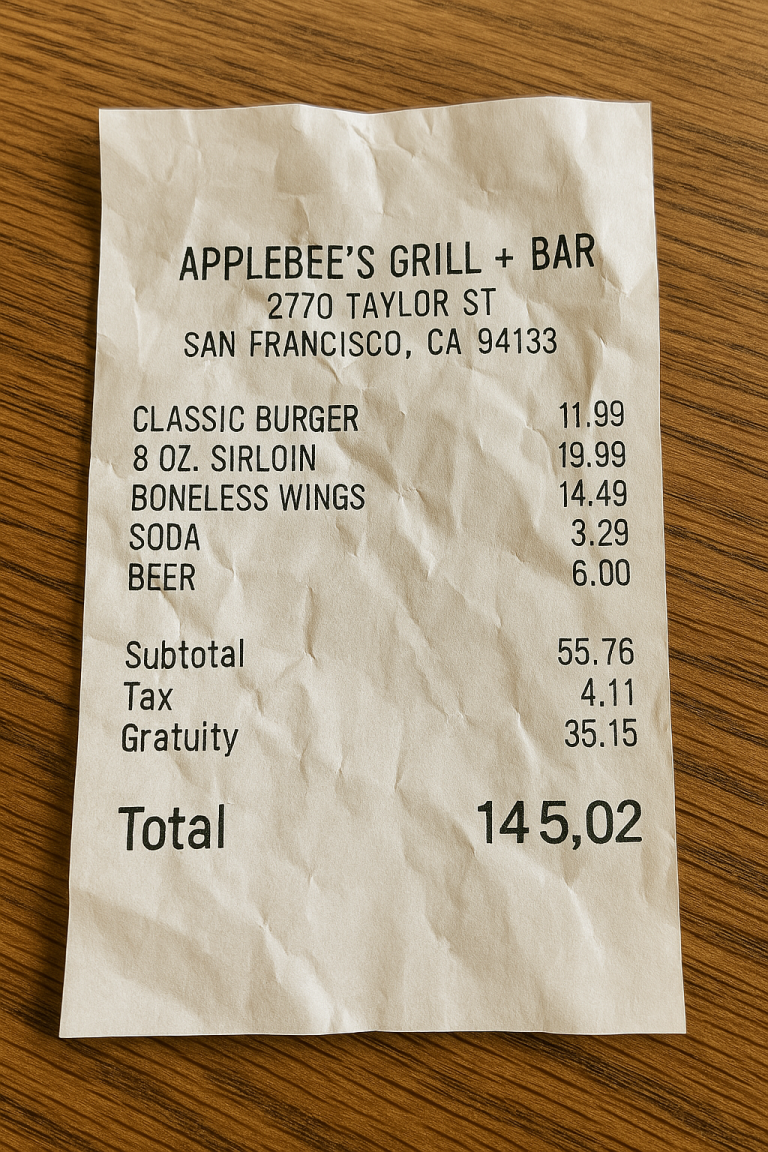
The most common techniques our teams see:
- Created from scratch: an entirely fictitious receipt, generated from a prompt describing a restaurant, an amount and a date
- Altered real receipts: amount, date or number of guests changed on a genuine receipt
- Hybrid receipts: elements of several real receipts combined into one composite document
- Duplicates with variations: the same receipt slightly modified, submitted by different employees or on different dates
Unlike the crude edits of the past, every AI-generated fake is unique: it shares no visual signature with the others and matches no document already in the system.
Red flags: how to spot an AI-generated fake receipt
No single signal is proof. It is the accumulation that should trigger a closer look.
- Arithmetic that doesn't add up: line items don't sum to the subtotal, the total isn't subtotal plus tax, or quantity times unit price doesn't match the amount shown. Image generators produce a believable look, not correct math
- Odd tax lines: a VAT or sales tax rate that doesn't fit the type of expense or the country, strangely rounded tax, a malformed VAT or tax ID
- Unverifiable merchant: a business that can't be found, an address that doesn't exist, a company registration number that is invalid or belongs to another business
- Impossible date and time: an expense on a day the venue is closed, at an hour it isn't open, or in a city the employee wasn't in that day
- Missing or generic details: no receipt number, no table or till number, vague line items or dishes that aren't on the menu
- Off-market prices: amounts that don't match the venue's usual prices or the category
- Unusual image metadata: no camera information, traces of an editing or generation tool, unusual dimensions. Metadata is easy to strip, so its absence is only a weak signal
- No matching bank transaction: a large amount declared as paid in cash, or a card payment that doesn't appear on the statement
- Unusual behavior: amounts consistently just under approval thresholds, repeat visits to the same merchant, spending well above peers in the same location
Is this receipt fake? A five-step check
When one receipt looks suspicious, run these checks in order. None of them depends on how the image looks, and each takes a few minutes.
- Step 1, redo the math: add the line items, apply the tax rate, compare with the total. Example: a dinner receipt lists $18.50, $22.00 and $9.75, a subtotal of $50.25, sales tax at 8.875% (the combined rate in New York City) of $4.46, and a total of $56.71. The items and the tax are right, but $50.25 + $4.46 is $54.71, not $56.71. A printed till receipt does not make a $2 addition error
- Step 2, look up the merchant: does the business exist at that address, under that name, with that phone number? Does the tax or registration number on the receipt match public records?
- Step 3, check the date and time: was the venue open that day and at that hour, and was the employee in that city according to the travel booking?
- Step 4, find the payment: match amount, date and merchant with the corporate card statement. If the receipt says cash, ask why for that amount
- Step 5, compare with the employee's other receipts from the same merchant: same layout, same receipt numbering, a plausible sequence?
If two or more checks fail, escalate under your expense policy rather than confronting the employee on a hunch. In the US, lodging and any expense of $75 or more need documentary evidence anyway (IRS receipt requirements), so these are the receipts to check first.
Why manual review and traditional controls fall short
An experienced reviewer will catch a poor photocopy or an obviously wrong amount. Faced with a generated receipt that has the right visual codes (the merchant's typeface, the local tax format, plausible numbering), the human eye reaches its limits. Sampling makes things worse: checking a fraction of expense reports leaves the rest of the risk unwatched. And classic duplicate detection sees nothing, because each fake is unique.
Relying on human vigilance alone is a race the defender loses: every improvement in manual review is followed by better forgery tools.
How to detect fake receipts automatically: a layered approach
No single technique is enough. EVA, TEVASOFT's AI audit layer, combines several analyses on every receipt:
- Image forensics: metadata, pixel consistency, compression artifacts and signatures typical of generation tools. A smartphone photo and a generated image differ in subtle but measurable ways
- Math validation: subtotals, total, tax rate and amount, consistency with the venue's prices
- Merchant cross-checks: address, company registration, opening hours, the usual receipt format of the business
- Card reconciliation: comparing the receipt with the corporate card transaction (amount, date, merchant)
- Behavioral and statistical analysis: the employee's spending profile, gaps versus peers, amounts close to thresholds, unusual frequencies
Generation and detection models evolve quickly, and not always at the same pace, so some fakes can pass the initial check. That is why EVA can re-run audits retroactively on receipts that were already reimbursed, for example every six months as detection models improve. A fake that slipped through in January can be caught in a July sweep: the risk of being caught later keeps rising.
Can SAP Concur detect fake receipts?
Not as such. SAP Concur Expense applies the audit rules the company has configured (limits, required fields, categories, receipt requirements) and can match expenses against imported corporate card transactions. SAP also offers optional audit services. These checks work on the expense report data, not on whether the receipt image is authentic: an AI-generated receipt whose fields comply with policy passes those rules.
Detecting that a receipt was fabricated means analyzing the document itself. EVA does this by plugging into SAP Concur, with no change of expense tool (SAP Concur integration). The same applies to N2F, Lucca and Cegid.
The structural answer: make fake receipts useless
Better detection is not enough in the long run. The question becomes: how do you make a fake receipt worthless? The answer fits in one idea: if the proof of an expense no longer goes through the employee, the employee can no longer falsify it.
Lever 1: corporate cards. When an expense is paid with a corporate card, the amount, date and merchant come straight from the bank. The receipt is still required, but any forgery runs into bank data the employee cannot change: an inflated amount, a fictitious merchant or an altered date is contradicted by the statement.
Lever 2: e-invoicing. For hotels, restaurants and travel, the invoice can flow directly from the supplier to the company without passing through the employee. That is the direction of France's e-invoicing reform, which requires every VAT-registered company to be able to receive e-invoices from September 1, 2026, and of the ViDA directive across the European Union.
With both levers in place, cash payments and untraceable flows become a minority of expense lines. Fake-receipt detection can then focus on that residue, where the real risk is.
CFO checklist: what to do now
- Review 100% of receipts, not a sample
- Automatically check the math and tax on every receipt
- Cross-check merchants: registration or tax ID, address, opening hours
- Systematically match expenses to corporate card transactions
- Tighten rules on cash reimbursements above a set amount (original receipt, extra approval)
- State in the expense policy that submitting a fake receipt is misconduct, with the sanctions that apply
- Schedule regular retroactive audits of reimbursed reports
- Prepare to receive e-invoices for your main expense categories
- Train approving managers on the red flags, without making detection depend on their eyes alone
- Document the controls performed for internal and external auditors
Further reading: our white paper on AI-generated receipts, the overview of expense fraud types, why a PDF receipt is not proof and how to catch duplicate expenses. To compare tools, read our expense audit software buyer's guide. To see EVA on your own data: expense fraud detection.
Frequently asked questions
How can I tell if a receipt was generated by AI?
Look at the data rather than the image: correct math and tax, a merchant that exists with a valid registration number, a date that fits the venue's opening hours, plausible image metadata and a matching bank transaction. It is the accumulation of inconsistencies that points to a fake.
Can you spot an AI-generated fake receipt by eye?
Rarely. Current tools reproduce the typeface, the layout and even paper wear. In a SAP Concur survey published in early 2026, 32% of finance professionals said they would not recognize an AI-generated receipt during a manual review.
Can SAP Concur detect fake receipts?
SAP Concur applies the audit rules the company configures (limits, required fields, card matching) but does not, as standard, check whether the receipt image is authentic. A dedicated analysis layer such as EVA, plugged into SAP Concur, examines the document itself.
Is image metadata enough to prove fraud?
No. Metadata is easy to strip or edit. Its absence is a weak signal, to be combined with checks on the math, the merchant and the bank transaction.
What is the best protection against AI-generated fake receipts?
Combine automated review of 100% of receipts with fewer expenses whose proof goes through the employee: corporate cards by default and e-invoices received directly from suppliers.
Is this receipt fake? How do I check a single receipt?
Redo the math (line items, tax, total), look up the merchant, check the date against opening hours and the employee's travel, then find the matching card transaction. If two or more of these checks fail, treat the receipt as suspicious and escalate under your expense policy.
Is there a fake receipt detector that works on the image alone?
Tools that only analyze the image can flag editing traces or missing metadata, but a well-made AI-generated receipt can pass them. A reliable check combines the image with data the forger does not control: the card transaction, the merchant's public records and the employee's spending history. EVA runs these checks on every receipt submitted in SAP Concur.
How can a CFO spot AI-generated receipts in expense claims?
Not by relying on approvers' eyes. Put three controls in place: automated checks on 100% of receipts (math, tax, merchant, card match), extra approval for cash expenses above a set amount, and periodic retroactive audits of reimbursed reports. The CFO checklist above lists the full set.
What should I do if a fake receipt is found after reimbursement?
Document the inconsistencies, review the employee's other expense reports and follow your internal procedure with HR and legal. Submitting a fabricated receipt can be treated as forgery or fraud under criminal law in many jurisdictions.
Sources
[1] TechCrunch, ChatGPT's new image generator is really good at faking receipts, March 2025
[2] Financial Times, AppZen data on AI-generated fraudulent documents, 2025
[3] SAP Concur, survey of finance professionals, early 2026